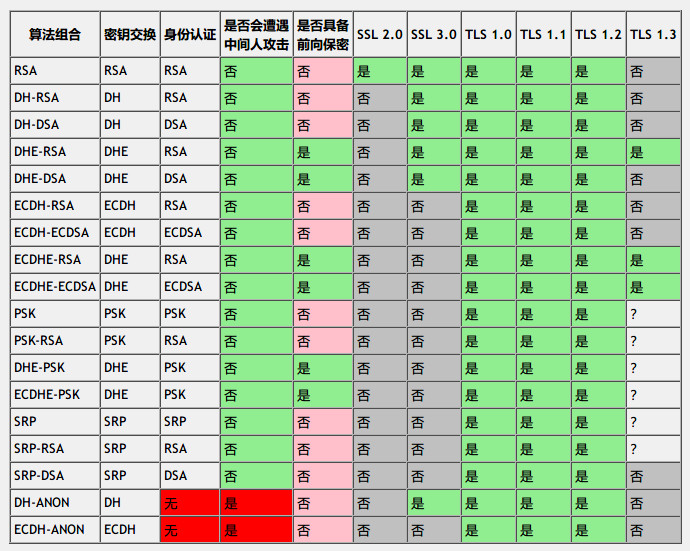
来源:https://program-think.blogspot.com/2016/09/https-ssl-tls-3.html
发布时间:December 2, 2019 // 分类: // No Comments
发布时间:December 2, 2019 // 分类: // No Comments
tls协议当使用ECDHE交换密钥时会使用rsa或ecdsa验证签名,测试rsa2048和ecc256签名验证签名速度:
openssl speed rsa2048 ecdsap256tls协议传输内容使用aes或chacha20加密,测试chacha20-poly1305和aes-128-gcm加解密速度:
#单核
openssl speed -evp chacha20-poly1305
openssl speed -evp aes-128-gcm
#多核
openssl speed -multi $(cat /proc/cpuinfo |grep processor | wc -l) -evp aes-128-gcm
禁用硬件加速测试aes-128-gcm加解密速度:
OPENSSL_ia32cap="~0x200000200000000" openssl speed -evp aes-128-gcmgolang:
go test -bench=. crypto/cipher
go test -bench=. crypto/aes
go test -bench=. crypto/tls发布时间:December 2, 2019 // 分类: // No Comments
tls1.2版本可在tls config中配置:
        tlsconf := &tls.Config{
                InsecureSkipVerify:       true,
                MaxVersion:               tls.VersionTLS13,
                MinVersion:               tls.VersionTLS12,
                PreferServerCipherSuites: true,
        }
        tlsconf.CipherSuites = []uint16{
                tls.TLS_AES_128_GCM_SHA256,
                tls.TLS_CHACHA20_POLY1305_SHA256,
                tls.TLS_AES_256_GCM_SHA384,
                tls.TLS_ECDHE_RSA_WITH_CHACHA20_POLY1305,
                tls.TLS_ECDHE_ECDSA_WITH_CHACHA20_POLY1305,
                tls.TLS_ECDHE_RSA_WITH_AES_128_GCM_SHA256,
                tls.TLS_ECDHE_ECDSA_WITH_AES_128_GCM_SHA256,
                tls.TLS_ECDHE_RSA_WITH_AES_256_GCM_SHA384,
                tls.TLS_ECDHE_ECDSA_WITH_AES_256_GCM_SHA384,
                tls.TLS_ECDHE_RSA_WITH_AES_128_CBC_SHA256,
                tls.TLS_ECDHE_RSA_WITH_AES_128_CBC_SHA,
                tls.TLS_ECDHE_ECDSA_WITH_AES_128_CBC_SHA256,
                tls.TLS_ECDHE_ECDSA_WITH_AES_128_CBC_SHA,
                tls.TLS_ECDHE_RSA_WITH_AES_256_CBC_SHA,
                tls.TLS_ECDHE_ECDSA_WITH_AES_256_CBC_SHA,
        }
tls1.3看官方文档不支持配置CipherSuites,在tls/common.go中initDefaultCipherSuites()会根据cpu是否支持aes硬解设置TLS_AES_128_GCM_SHA256或TLS_CHACHA20_POLY1305_SHA256优先
https://golang.org/src/crypto/tls/common.go
https://golang.org/pkg/crypto/tls/#Config
发布时间:December 1, 2019 // 分类: // No Comments
stream {
  log_format tcp '$remote_addr [$time_local] '
    '$protocol $status $bytes_sent $bytes_received '
    '$session_time "$upstream_addr" '
    '"$upstream_bytes_sent" "$upstream_bytes_received" "$upstream_connect_time"';

  log_format stream_routing '$remote_addr [$time_local] '
    'with SNI name "$ssl_preread_server_name" '
    'proxying to "$upstream_addr" '
    '$protocol $status $bytes_sent $bytes_received '
    '$session_time';

  map $ssl_preread_server_name $name {
    ~^www.haiyun.me haiyun;
    ~^haiyun.me haiyun;
    default nginx;
  }
  upstream haiyun {
    #hash $remote_addr consistent;
    server 1.1.1.1:1111 weight=5 max_fails=1 fail_timeout=10s;
    server 1.1.1.1:1112 weight=5 max_fails=1 fail_timeout=10s;
    server 1.1.1.1:1113 weight=5 max_fails=1 fail_timeout=10s;
  }
  upstream nginx {
    server 127.0.0.1:4443;
  }
  server {
    listen 443 ;
    listen [::]:443 ;
    ssl_preread on;
    proxy_protocol on;
    proxy_pass $name;
    proxy_connect_timeout 10s;
    proxy_timeout 10s;
    access_log /run/log/nginx/access.log tcp;
    error_log /run/log/nginx/error.log;
  }
}
后端获取来源真实IP:
server
{
  listen       1443 default proxy_protocol ssl ;
  server_name www.haiyun.me haiyun.me;

  set_real_ip_from 127.0.0.1;
  real_ip_header proxy_protocol;
}
遇到的一些问题:
1.修改stream内配置后nginx -s reload无效,需重启nginx
2.当开启proxy_protocol后每个后端都要支持proxy_protocol,不然无法正常连接,这点不如haproxy,可以指定后端开启
https://docs.nginx.com/nginx/admin-guide/load-balancer/tcp-udp-load-balancer/
https://docs.nginx.com/nginx/admin-guide/load-balancer/using-proxy-protocol/